Starting a business is exciting, but it can also feel overwhelming. Many small business owners try to handle marketing, customer communication, bookkeeping, design, and planning all at once. The challenge becomes even harder when money is tight and every naira or dollar counts.
- Quick Answer / Key Takeaways
- Why Free Tools Matter for Small Businesses
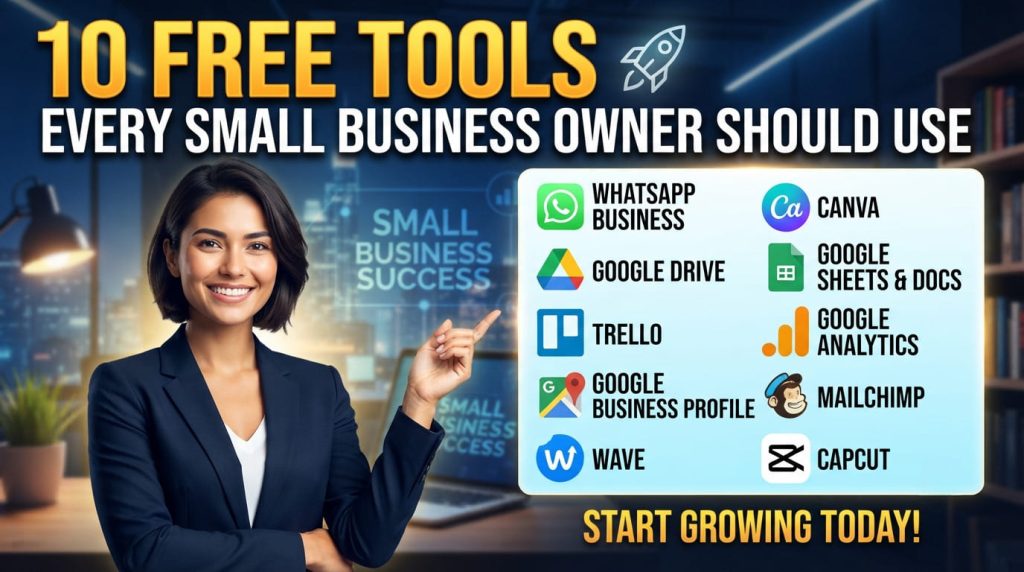
- 10 Free Tools Every Small Business Owner Should Use
- 1. WhatsApp Business — Customer Communication
- 2. Canva — Graphic Design
- 3. Google Drive — File Storage and Sharing
- 4. Google Docs and Sheets — Documents and Accounting
- 5. Trello — Task and Project Management
- 6. Google Analytics — Website Traffic Tracking
- 7. Google Business Profile — Local Visibility
- 8. Mailchimp (Free Plan) — Email Marketing
- 9. Wave — Basic Bookkeeping
- 10. CapCut — Video Editing
- The Best Combination for a New Business
- Step-by-Step Setup in One Afternoon
- Practical Example / Scenario
- Common Mistakes to Avoid
- Recommended Free Resources
- Frequently Asked Questions (FAQ)
- Final Action Plan
- Conclusion
The good news is that you do not need expensive software to run a professional business. Today, there are powerful free tools that can help you stay organized, attract customers, create quality content, and make better decisions. Whether you run a fashion brand in Lagos, a freelance service online, a small shop, a food business, or a startup anywhere in the world, these tools can save time and reduce stress.
In this guide, you will discover 10 free tools every small business owner should use, what each tool does, and how to start using them immediately. By the end of this article, you will have a practical toolkit that can help you manage your business more efficiently without increasing your expenses.
Quick Answer / Key Takeaways
Best free toolkit for beginners
- Best overall productivity tool: Google Workspace (free personal tools)
- Best design tool: Canva
- Best customer communication tool: WhatsApp Business
- Best bookkeeping starter tool: Wave (where available)
- Best website analytics tool: Google Analytics
- Cost: Free
- Time required to set up: 1–2 hours
- Who it is for: New and growing small business owners
- Biggest mistake to avoid: Using too many tools at once without a simple workflow
Why Free Tools Matter for Small Businesses
Free tools are not just for businesses with no budget. They help you:
- Reduce startup costs
- Test business ideas before investing heavily
- Work more professionally
- Automate repetitive tasks
- Focus on serving customers instead of managing paperwork
The key is to choose a few tools that solve real problems rather than downloading every app you see online.
10 Free Tools Every Small Business Owner Should Use
1. WhatsApp Business — Customer Communication
Best for: Customer support, orders, and quick updates.
Why it matters
Many customers in Nigeria and across Africa prefer messaging businesses directly instead of sending emails.
Useful free features
- Business profile
- Quick replies
- Product catalog
- Labels for organizing customers
- Automated greeting messages
Quick start
- Download WhatsApp Business.
- Add your business name and logo.
- Create quick replies for common questions.
- Upload your products or services to the catalog.

2. Canva — Graphic Design
Best for: Social media posts, flyers, logos, and presentations.
Why it matters
Professional design builds trust, and Canva allows beginners to create attractive visuals without design skills.
What you can create
- Instagram and Facebook posts
- Business cards
- Price lists
- Posters
- Presentation slides
Expert tip
Use Canva’s brand kit to keep your colors and fonts consistent.
3. Google Drive — File Storage and Sharing
Best for: Storing business documents safely online.
Free benefits
- Cloud storage
- Easy file sharing
- Automatic saving
- Access from phone or computer
Create folders such as Customers, Invoices, Marketing, and Legal Documents to stay organized.
Also Read: How to Create a Simple Business Plan for Funding Applications
4. Google Docs and Sheets — Documents and Accounting
Best for: Writing documents and tracking business finances.
Practical uses
| Tool | Use |
| Google Docs | Proposals, contracts, letters |
| Google Sheets | Sales records, expenses, inventory |
| Google Forms | Customer feedback and order forms |
A simple spreadsheet can be enough for many new businesses before they move to paid accounting software.
5. Trello — Task and Project Management
Best for: Organizing daily business activities.
Simple setup
Create three columns:
- To Do
- Doing
- Done
Add tasks such as post on Instagram, call supplier, deliver order, and update inventory. This gives you a clear view of your workload.
6. Google Analytics — Website Traffic Tracking
Best for: Understanding visitors to your website.
What you can learn
- How many people visit your site
- Which pages are most popular
- Where visitors come from
- Which marketing efforts bring results
Even a simple business website should have analytics installed from day one.
7. Google Business Profile — Local Visibility
Best for: Appearing in Google Search and Google Maps.
Why local businesses need it
When someone searches for tailor near me or furniture store in Lagos, Google Business Profile helps your business appear in local results.
Free advantages
- Business listing
- Customer reviews
- Directions
- Photos
- Opening hours
Encourage satisfied customers to leave honest reviews.
8. Mailchimp (Free Plan) — Email Marketing
Best for: Building a customer list.
Use it to
- Send promotions
- Announce new products
- Share helpful tips
- Reconnect with past customers
Start collecting customer emails early, even if your list is small.
9. Wave — Basic Bookkeeping
Best for: Tracking income and expenses.
Helpful features
- Expense tracking
- Invoice creation
- Financial reports
- Receipt management
If Wave is not available in your country, you can begin with Google Sheets and upgrade later.
10. CapCut — Video Editing
Best for: Short marketing videos.
Video content often performs better than images on social media. CapCut makes it easy to:
- Trim videos
- Add text
- Add music
- Create product demos
- Make social media reels
A 15–30 second product video can attract significant attention online.
The Best Combination for a New Business
If you are just starting, begin with these five tools first:
| Need | Free Tool |
| Customer communication | WhatsApp Business |
| Design | Canva |
| File storage | Google Drive |
| Finance tracking | Google Sheets |
| Task management | Trello |
Master these before adding more tools.
Step-by-Step Setup in One Afternoon
Hour 1
- Create a Google account.
- Set up Google Drive folders.
- Create a simple expense spreadsheet.
Hour 2
- Install WhatsApp Business.
- Upload your logo and business details.
- Create quick replies.
Hour 3
- Open Canva.
- Design one social media post and one price list.
Hour 4
- Create a Trello board.
- Add your top 10 business tasks for the week.
By the end of the day, your business operations will already be more organized.
Practical Example / Scenario
Amina runs a small baking business in Lagos.
Before using free tools, she received orders through personal WhatsApp messages, forgot customer requests, and tracked expenses in a notebook.
After setting up:
- WhatsApp Business for orders,
- Canva for cake flyers,
- Google Sheets for daily sales,
- Google Drive for customer photos, and
- CapCut for short cake videos,
she became more organized, responded faster to customers, and promoted her cakes consistently online without paying for expensive software.
This is a realistic example of how free digital tools can improve a small business.
Common Mistakes to Avoid
- Using too many tools: Start with a few essential tools and add others only when needed.
- Not backing up files: Always store important documents in Google Drive or another cloud service.
- Ignoring customer messages: Fast responses often win customers.
- Mixing personal and business accounts: Use dedicated business accounts for professionalism and easier record keeping.
- Failing to track expenses: Small daily expenses add up quickly. Record them consistently.
- Posting inconsistent branding: Use the same business name, logo, colors, and phone number across all platforms.
- Never reviewing analytics: Check website or social media performance regularly to see what works.
Recommended Free Resources
Business Learning
Productivity
Marketing
Local Business Growth
Use official websites whenever possible to avoid scams and outdated information.
Frequently Asked Questions (FAQ)
What is the best free tool for a small business?
WhatsApp Business is often the best starting point because it directly helps you communicate with customers and generate sales.
Can I run a business using only free tools?
Yes. Many freelancers and small businesses successfully operate with free tools during their early stages.
Which free tool is best for bookkeeping?
Google Sheets is the simplest option for beginners, while Wave offers more accounting features where available.
Are free business tools safe?
Reputable tools such as Google products, Canva, Trello, and WhatsApp Business are generally safe when you use strong passwords and two-factor authentication.
Do I need a website before using these tools?
No. You can start with WhatsApp Business and Google Business Profile, then add a website later.
Which tool helps me get more customers?
Google Business Profile and Canva can significantly improve local visibility and marketing.
Is Canva really free?
Yes. Canva has a free plan with many templates and design features suitable for most small businesses.
What should I set up first today?
Set up WhatsApp Business, Google Drive, and a Google Sheets expense tracker first.
Final Action Plan
Step 1: Set up three essentials today
- WhatsApp Business
- Google Drive
- Google Sheets expense tracker
Step 2: Create one marketing asset
Design a simple social media post in Canva and publish it today.
Step 3: Organize your week
Create a Trello board and add your top business tasks for the next seven days.
You can complete all three steps within the next 24 hours.
Conclusion
Using the right free tools can make a small business look more professional, stay organized, and grow faster without increasing expenses. The most important lesson is not to use every tool available, but to choose a small set that solves your immediate business problems.
Start with communication, organization, finance tracking, and simple marketing. As your business grows, you can decide whether you need paid software, but many entrepreneurs discover that free tools remain useful for years.
If you implement even three of the tools in this guide today, you will already be operating more efficiently than many new business owners.
For more practical business, career, scholarship, and digital growth guides, explore other resources on LeverageHub.net and continue building your business one smart step at a time.